The 10% you see.
A kanban board and linked docs. Fast, keyboard-first, pleasant. The part of Glacier above the waterline.
1,000+ cards · 10+ workspaces · 7,000+ Claude assists
This is our actual board.
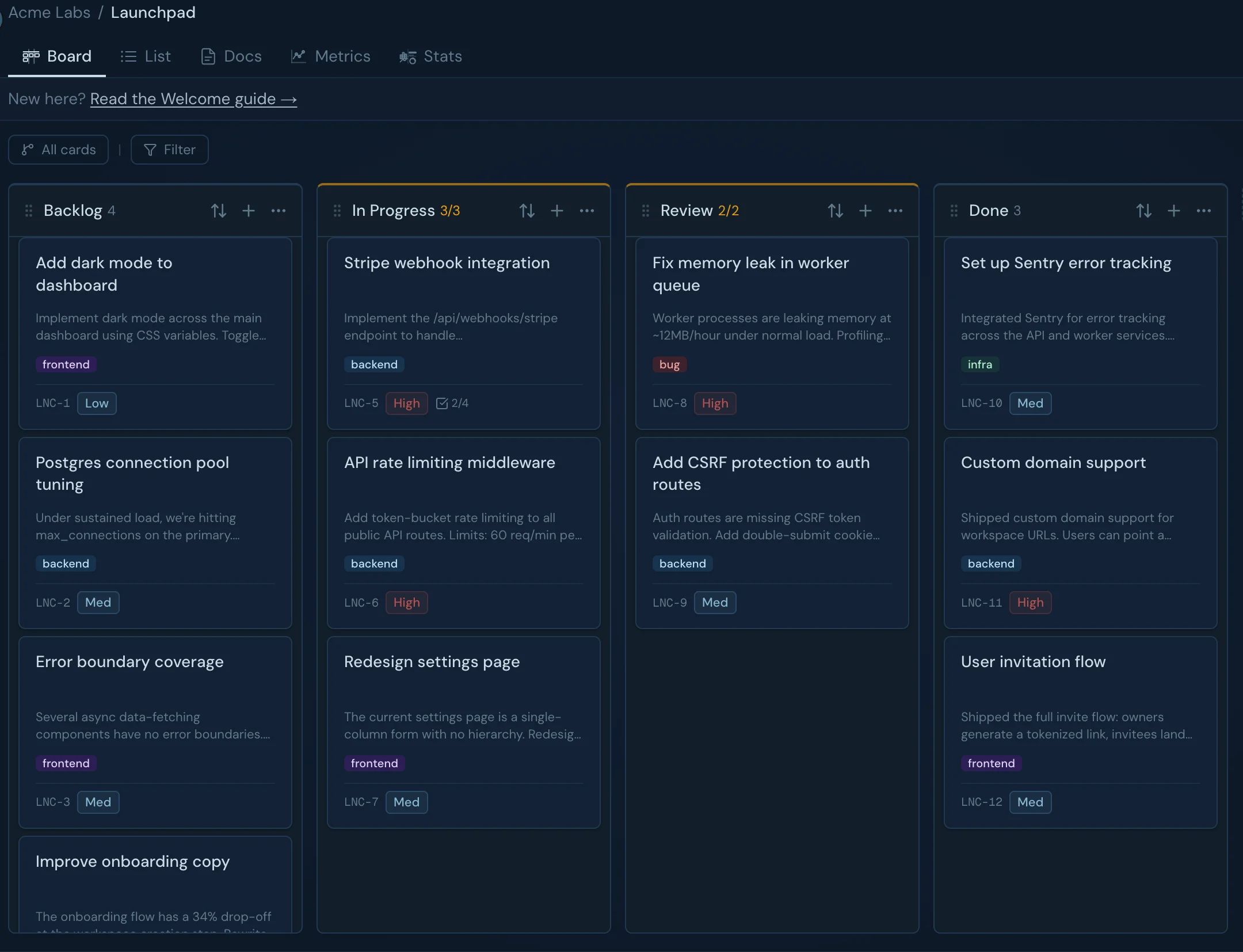
What you see: a clean kanban board and a linked doc editor. Fast, minimal, keyboard-friendly. No bloat.
What’s underneath: an MCP server that exposes your entire workspace, cards, docs, projects, priorities, to Claude or any AI agent. Read and write. Native. No plugins. No copy-paste. No context switching.
BELOW THE WATERLINE · DEPTH 200m
The 90%
that makes it work.
An MCP server that exposes every card, column, doc, label, member, and metric to Claude. Native OAuth 2.1. Role-gated.
MCP in action
Claude doesn’t summarize your board. It uses it.
One authorization gives Claude full workspace access — read and write. Not a plugin, not a wrapper. Native MCP protocol, built into the product from day one.
WHAT’S BUILT · 200m
What makes Glacier different.
Three things nothing else on the market does the way Glacier does.
MCP-native, from day one
OAuth 2.1 + PKCE discovery. 19 read tools, 36 write tools. Role-gated. Claude.ai, Desktop, Cursor: one connection, full access.
Inline AI doc review
Claude proposes edits as strike-through and replacement, right in your doc. Rationale in the hover popover. Accept, reject, or discuss.
Flow-based, not ticket-based
Cycle time, throughput, WIP limits, flight levels. The metrics technical teams actually use. Built-in, not bolted on.
INLINE AI DOC REVIEW
Claude proposes. You decide.
Strike-through originals, inline replacements, rationale in the hover popover. Accept, reject, or discuss — right in the doc.
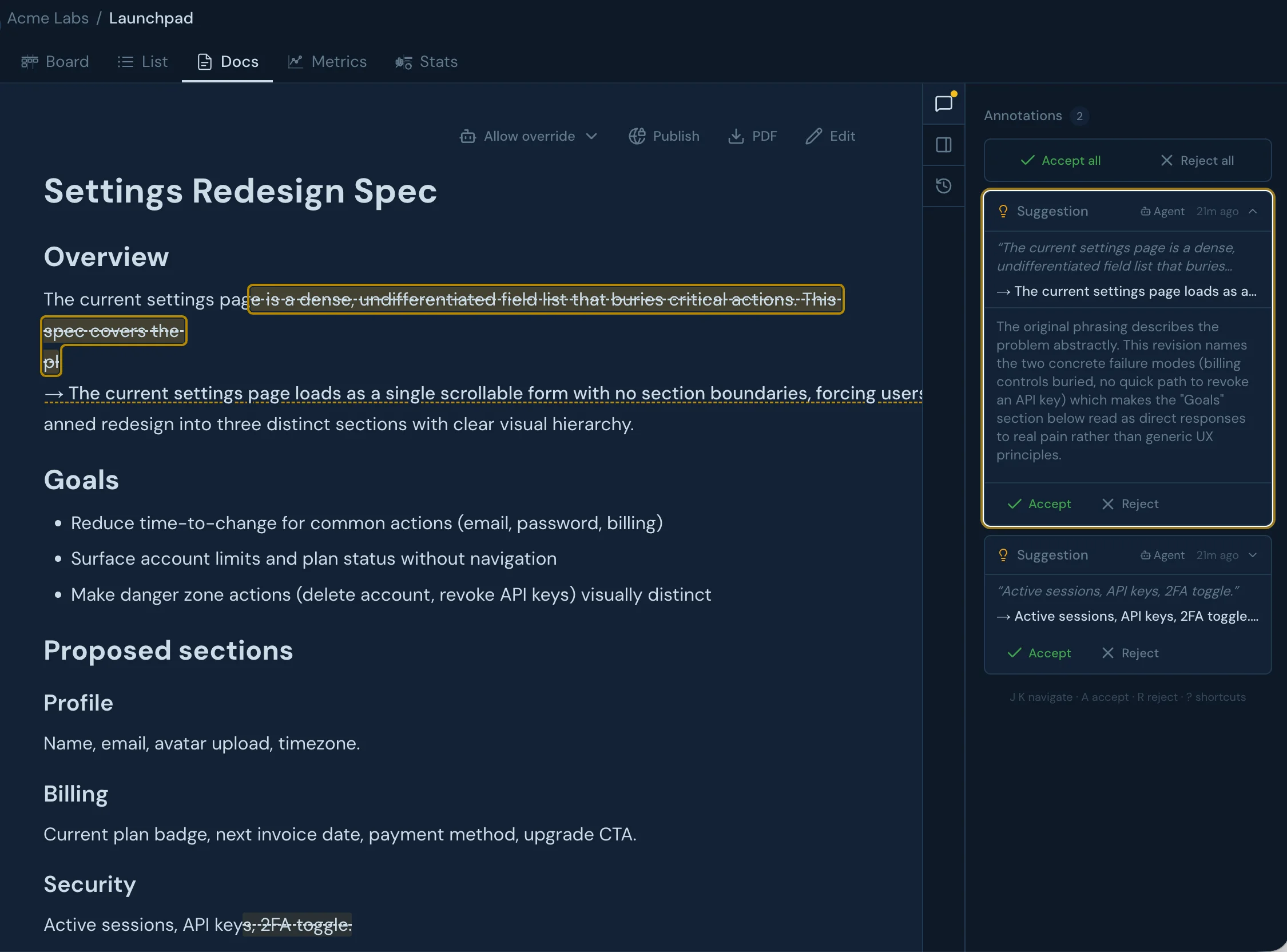
When Claude reviews a doc via MCP, it proposes edits as inline diffs — struck-through originals with replacement text and a rationale attached. You accept, reject, or open a thread, all without leaving the editor. No copy-paste, no context switching. The AI is a collaborator in the doc, not a chatbot in a sidebar.
Table stakes
Not a prototype. A working product.
Board
- Column types: queue, active, waiting, done
- WIP limits with visual breach indicator
- Drag-and-drop with keyboard shortcuts
- Flight levels (opt-in per project)
- Cycle time and throughput metrics
- Full-text search and command palette
Cards
- Card hierarchy with parent and child items
- Subtask checklists with progress rollup
- GitHub issue and PR linking
- File attachments
- Threaded comments with markdown
- Priority, assignee, labels, watchers
Docs
- ProseMirror rich text editor
- Doc tree with parent / child hierarchy
- Slash commands and markdown shortcuts
- Link docs to cards
- Table support
- Full-text search across all docs
Platform
- Multi-workspace, multi-project
- Clerk auth with SSO support
- Owner / Admin / Member / Viewer roles
- Role-based MCP tool permissions
- OAuth 2.1 and API key auth for MCP
- Dark and light theme
THE CARD
Where work and context meet.
The card is the unit where hierarchy, subtasks, GitHub linking, comments, and linked docs all converge — everything Claude and your team need in one place.
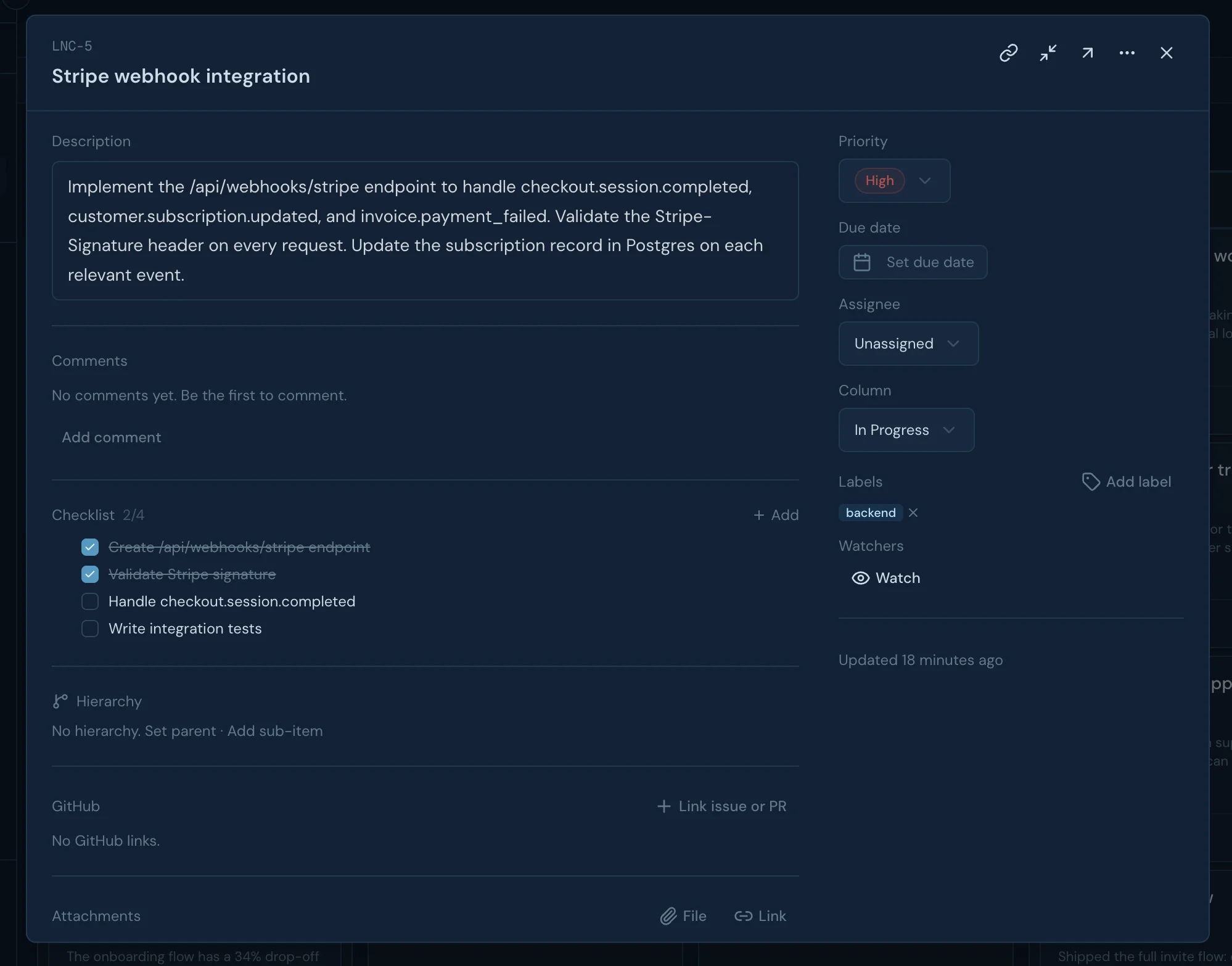
Work and knowledge live together: the card holds the task, the thread holds the decisions, and the linked doc holds the spec — all in one surface. Subtasks roll up progress without creating noise. GitHub PRs attach natively so Claude knows what shipped. Attachments, priority, assignee, labels, and watchers complete the picture without a second app.
DEPTH 600m · MCP tools
Every tool Claude needs.
19 read tools, 36 write tools. Role-gated: write tools require board:write permission. Viewers get read-only.
workspace
- list_workspaces
- list_projects
- list_members
board
- list_columns
- list_flight_levels
cards
- list_cards
- list_my_cards
- get_card
- get_card_children
docs
- list_docs
- get_doc
- search_docs
- export_doc
- get_mermaid_guide
annotations
- list_card_comments
- list_annotations
labels
- list_labels
github
- get_card_github_status
metrics
- get_flow_metrics
cards
- create_card
- create_cards
- update_card
- duplicate_card
- update_subtasks
- set_card_labels
- add_card_watcher
- remove_card_watcher
board
- create_column
- update_column
- delete_column
- create_flight_level
- update_flight_level
docs
- create_doc
- update_doc
- link_doc_to_card
- link_docs
annotations
- propose_suggestion
- add_card_comment
- create_comment
- reply_to_annotation
- resolve_annotation
- reject_annotation
labels
- create_label
- update_label
- delete_label
github
- link_card_to_github
attachments
- add_attachment_to_card
- remove_attachment_from_card
- upload_attachment
- upload_attachment_from_url
- get_upload_url
- start_upload
- upload_chunk
- confirm_upload
- complete_upload
Comparison
How Glacier compares.
Linear, Notion, Flux, and Kanbo all have some slice of board, docs, or AI. None were designed around MCP from day one. Glacier ships OAuth 2.1 + PKCE auth, role-gated tools, flow metrics, and a unified board + docs surface built for the way teams actually work with Claude.
| Capability | Glacier | Linear | Notion | Flux | Kanbo |
|---|---|---|---|---|---|
| Kanban / flow board | Native | Issues | DB view | Board | Native |
| Linked docs | Card-linked | Minimal | Core | Minimal | — |
| MCP server | Native (day 1) | Retrofitted | Retrofitted | Beta | — |
| MCP read + write | Full | Full | Full | Partial | — |
| OAuth 2.1 + PKCE (MCP auth) | RFC-native | API key | API key | — | — |
| Role-based MCP permissions | Native | — | — | — | — |
| Flow metrics (cycle time + throughput) | Built-in | — | — | — | Analytics |
| Board + docs in one MCP surface | Unified | Issues only | Pages only | Board only | — |
| WIP limits | Built-in | — | — | — | Built-in |
| Card comments | Threaded | Threaded | Inline | Threaded | Threaded |
| AI doc suggestions (inline review) | Native | — | AI blocks (no diff) | AI native | — |
| AI as collaborator | First-class | MCP + agent | MCP + AI blocks | Core product | — |
| Setup time | Minutes | Fast | High | Fast | Fast |
| Mobile native appconcession | — | iOS + Android | iOS + Android | — | iOS + Android |
Accurate as of May 2026. Linear MCP: launched May 2025, expanded Feb 2026. Notion MCP: hosted server, full read + write. Flux: AI-native board, MCP in beta.
Who it’s for
We build on what we ship.
Small technical collectives, 2 to 10 people, where AI is already in the daily workflow. Teams where Claude Code is open next to the terminal. Where context moves faster than standups. Where the bottleneck isn’t headcount, it’s information architecture.
Black Bear Studio runs on Glacier. Plato gets built on it. Every friction point becomes a fix.
FAQ
Common questions.
Does it work with Cursor, Windsurf, or Zed?
Any MCP-compatible client works. OAuth discovery is RFC 8414 compliant, and we also support static API keys for clients that prefer those.
Can I self-host?
Not on standard plans. Custom deployments include support and we're open to conversations about private instances.
How does agent attribution work?
Every edit—human or Claude—is attributed at the annotation level. You see who proposed what, when, and why, with side-by-side diffs before anything merges.
What happens to my data?
Stored on Neon Postgres in the EU. No training. No third-party access. Export to Markdown at any time.
How much does Glacier cost?
€10 per seat per month, or €96 per seat per year. Fourteen-day free trial, no credit card required. See the pricing page for full details.
RESURFACE
Ready to come back up?
Start your 14-day free trial. No card required to sign up -- connect your workspace, invite your team, and see what Glacier can do.